
# Content pages
Keaze has a flexible built-in Headless CMS that allows creating content pages for different sections in a portal, like blog pages, news pages, FAQ pages or any other content pages.
For compatibility reason with Property Booking, one of the content type (Area pages) has their own endpoints, but it could also be consumed by using the generic endpoints. In this guide, Area pages are introduced first, and then the generic endpoints, under the topic Headless CMS, used to consume other content pages.
These endpoints are only available for Keaze Marketplace Portal.
# Area pages
# List of area pages per scheme
To get the list of all the areas per scheme and regions, send a GET to /api/rest/portal/scheme-areas.
# Response
Every element in the collection is an object with three levels of information: Scheme details, region details and area details.
Scheme fields
| Field name | Type | Nullable | Description |
|---|---|---|---|
id | number | false | Scheme reference id in the database |
name | string | false | Scheme name |
slug | string | false | Unique slug for the scheme |
color | string | false | Scheme color |
regions | array | false | Collection of all the regions |
Region fields
| Field name | Type | Nullable | Description |
|---|---|---|---|
name | string | false | Region name |
areas | array | false | Collection of all the areas |
Area fields
| Field name | Type | Nullable | Description |
|---|---|---|---|
id | number | false | Area reference id in the database |
name | string | false | Name of the area |
slug | string | false | Unique slug for the area |
Example
{
    "data": [
        {
            "id": 1,
            "name": "Shared ownership",
            "slug": "shared-ownership",
            "color": "#FF4F35",
            "regions": [
                {
                    "name": "London",
                    "areas": [
                        {
                            "id": 26,
                            "name": "Archway",
                            "slug": "archway"
                        },
                        {
                            "id": 24,
                            "name": "Barking",
                            "slug": "barking"
                        },
                        ...
                    ]
                },
                {
                    "name": "South East",
                    "areas": [
                        {
                            "id": 69,
                            "name": "Berkshire",
                            "slug": "berkshire"
                        },
                        {
                            "id": 29,
                            "name": "Brighton",
                            "slug": "brighton"
                        },
                        ...
                    ]
                },
                ...
            ]
        },
        {
            "id": 7,
            "name": "Help to Buy",
            "slug": "help-to-buy",
            "color": "#29908F",
            "regions": [
                {
                    "name": "London",
                    "areas": [
                        {
                            "id": 43,
                            "name": "Acton",
                            "slug": "acton"
                        },
                        {
                            "id": 45,
                            "name": "Beam Park",
                            "slug": "beampark"
                        },
                        ...
                    ]
                },
                {
                    "name": "South East",
                    "areas": [
                        {
                            "id": 94,
                            "name": "Epsom",
                            "slug": "epsom"
                        },
                        {
                            "id": 37,
                            "name": "Folkestone",
                            "slug": "otterpool-park"
                        },
                        ...
                    ]
                }
            ]
        }
    ]
}
# Area page content
To get the page content of a specific area, send a GET to /api/rest/portal/scheme-areas/pages/{id}, where id is the area page reference id. There's an alternative endpoint to use the area page slug instead of its id: GET /api/rest/portal/scheme-areas/pages/slug/{slug}. In both cases the response is the same.
# Response
| Field name | Type | Nullable | Description |
|---|---|---|---|
id | number | false | Area page reference id in the database |
name | string | false | Area name |
slug | string | false | Unique slug for the area page |
template | string | false | Template name that should match the template to use in the front-end to render the content. |
scheme | object | false | Scheme details: id, name, slug and color |
region | string | false | Region name |
titleTag | string | false | Html page suggested title |
metaKeywords | string | false | Html meta keywords |
metaDescription | string | false | Html meta description |
headline | string | false | Html H1 tag content |
content | object | false | The structure of this object will depend on the template. See below the current templates and their corresponding content structure. |
faqs | array | true | Collection of question - answer to be displayed in a FAQ section. This field is not mandatory, so notice it could be NULL |
mainImageUrl | string | true | Main image url if needed |
socialImageUrl | string | true | Image url for twitter or other social networks |
socialTitle | string | true | Suggested title for the twitter card of other social networks |
socialDescription | string | true | Suggested description for the twitter card of other social networks |
# Content structure
Right now there are only two templates supported for Area pages: basic and featured-listings, the only difference between both, is that featured-listings includes in the content JSON an extra field with a collection of relevant listings to display.
The general content structure is as follow:
| Field name | Type | Nullable of empty |
|---|---|---|
heading | string | true |
description | string | true |
title1 | string | true |
copy1 | string | true |
title2 | string | true |
copy2 | string | true |
The template is intended to have a top heading and description and two columns with their title and copy.
When the template is featured-listings the new field coming in content is called featuredListings and it's a collection of objects, with the following structure:
| Field name | Type | Nullable | Description |
|---|---|---|---|
image | string | false | Url for the image to display |
imageAltText | string | false | Alternative text for the image |
title | string | false | Title for the featured listing section |
content | string | false | Content for the featured listing section |
url | string | true | Listing slug |
Example:
{
"id": 7,
"name": "London",
"slug": "london",
"template": "featured-listings",
"scheme": {
"id": 1,
"name": "Shared ownership",
"slug": "shared-ownership",
"color": "#FF4F35"
},
"region": "London",
"titleTag": "10 BEST Shared Ownership properties in London to view for 2021",
"metaKeywords": "Shared ownership, Hackney, Islington, London city Island, shared ownership properties, London",
"metaDescription": "We've selected 10 of our best shared ownership properties for sale in London. Updated for 2021. Including new build homes in Hackney, Greenwich and London City Island.",
"headline": "Top 10 shared ownership properties in London",
"content": {
"heading": "Should I buy with shared ownership in London?",
"description": "London: it’s lively, it’s cool, it’s cosmopolitan. This is a city obsessed with the Next...",
"title1": "Part-buy Part-rent London",
"copy1": "<p>Culturally, it ticks all the boxes, job-wise – it’ll never let you down, and when it ...</p>",
"title2": "Resales in London",
"copy2": "<p>Living amongst the grandeur of Zone 1 isn’t ...</p>",
"featuredListings": [
{
"image": "https://static.propertybooking.co.uk/assets/locations/7/featured_properties/union-yard-cgi-2.jpg",
"image_alt_text": "Union Yard",
"title": "Union Yard, Bethnal Green",
"content": "<p>If you haven’t yet been enchanted by the quirk and hip of this down-to-Earth East End corner, you’re certainly missing out. Bethnal Green is a young professionals paradise with Overground and Underground stations as well as all the locals’ favourite haunts, ...</p>",
"url": "union-yard"
},
{
"image": "https://static.propertybooking.co.uk/assets/locations/7/featured_properties/ews-p1-cgi-2-bed-living-room.jpg",
"image_alt_text": "East Wick & Sweetwater",
"title": "East Wick & Sweetwater, Hackney",
"content": "<p>Just one of the new housing developments enriching the Queen Elizabeth Olympic Park in East Wick, this first-time buyer opportunity is one that certainly packs a punch. ...</p>",
"url": "east-wick-sweetwater"
},
...
]
},
"faqs": [
{
"question": "Who can qualify to buy a home with shared ownership in London?",
"answer": "<p>The eligibility criteria for shared ownership is simple; as long as you don’t currently own, or won’t own another property when you move in to a new home, ...</p>"
},
{
"question": "How much in savings will I need to buy with shared ownership in London?",
"answer": "<p>Shared ownership is much more affordable than buying outright, however you’ll still need a mortgage deposit. This is usually a minimum of 5 or 10%, ...</p>"
},
...
],
"mainImageUrl": "https://static.propertybooking.co.uk/assets/locations/7/main/Shared-Ownership-London-royal-docks-new.jpg",
"socialImageUrl": "https://static.propertybooking.co.uk/assets/locations/7/social/churchfield-quarter-shared-ownership.jpg",
"socialTitle": "The 10 BEST shared ownership properties in London for 2021",
"socialDescription": "Buying in London without a trust fund. Browse 4000+ shared ownership, new build, part buy part rent and resale homes in London. View apartments with balconies and houses with gardens."
}
# Get matching listings for an area
To get some listings that match the area, send a GET /api/rest/portal/scheme-areas/pages/{id}/listings
This endpoint will return a non-paginated collection of the most relevant listings considering the area scheme and location.
It allows the optional QueryString parameter size (default value is 6) to specify the maximum number of listings to return. Notice that in some cases you could receive an empty collection.
All responses are JSON encoded, and when the request is correct, the object will contain a unique field data, with the collection of listing details, using the same object structure as the ones returned by the search.
# Alternative endpoint
There exists an alternative endpoints when you use the slug of the area.
GET /api/rest/portal/scheme-areas/pages/slug/{slug}/listings
Where slug is the area page slug.
# Headless CMS
The Headless CMS is a Keaze built-in module that allows creating content pages for different sections in a portal, like blog pages, news pages, FAQ pages or any other content pages. It was built using a generic structure that doesn't respond to any specific data need and with the basic idea to separate content from presentation.
# Basic concepts
Find below a compact diagram of the Headless CMS structure.
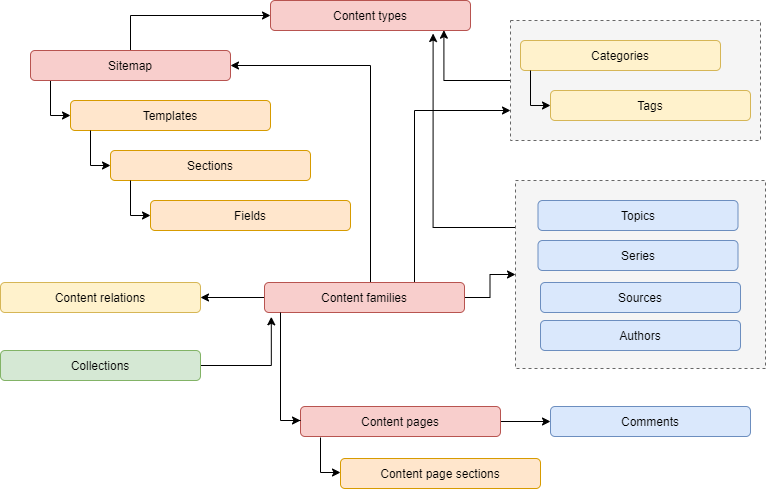
The main concepts (in red) are:
- Content types: Any of the different types of content pages portals usually have like blog post, news page, items list pages or generic pages which a fallback for pages likes about. They define general behaviour of pages with the same purposes by customizing the meaning of topic, source and series, and the use of the different tag categories. Content types can be added in the back-end based on the needs of Portals. Content types can be used to filter pages when consuming the API, by using the code of the content type, which must be unchangeable once there are defined.
- Sitemap: Defines the entries in the hierarchical structure of the portal which are related to the routes of the Portal. Think on a sitemap entry as the wrapper of all the pages with the same url structure in the portal. These pages have the same content type, and share a group of properties that are defined in the sitemap entry.
- Content families: It's the central entity for pages. It can group several pages that are going to be displayed in the portal by using a menu, but where every entry has a unique url, like several pages about the company, although they usually contain a single pages like in blogs. This entity is the one that establishes the relationships with most of the different concepts in the CMS like authors, topics, series, etc.
- Content pages: It's the representation of a physical page, which contains information about the page content, but also about some meta tags focused on SEO and social networks.
There are other important concepts that are explained in the below sections.
# Sitemap templates
In order to separate content from presentation, sitemaps use the concept of templates, which can be described as references to the real html templates used on Portals. A sitemap must have at least one template, but it can have multiple ones. When a new content page is created, one of the templates need to be assigned.
Templates in modern Portals are basically html code with embedded expressions, usually coming from models, where every template usually requires a particular model. These are the basic ideas used to build the templates in the back-end, they have a model definition, which is specific for the template itself, and should match, in some way, the implementation of the real html template in the Portal.
Template models are defined by using sections and fields, where a section is a group of fields that generate a json object in the model. Sections can have multiple instances of the object or be a single object. The final model will have as many root attributes as sections, and every section will be an array of a single object, which definition is based on its fields. When requesting a page content the model will come under the attribute sections in the payload.
There are 5 supported types of fields:
Text: A single line string.TextArea: A multi line string.Html: An HTML-formatted string.Image: An image which in the model will be the the full url of the image. At the moment there is no support for responsive images with different responsive versions.Url: It's basically a Text field, but by using a different type it provides semantic extra information.
Every section and every field has a name which is always a valid json attribute and it's the one used in the model, although some user-friendly labels are displayed in the back-end to create new contents.
Fields can have validation rules, which are helpful to create valid models. For sections it's mandatory to define if it's a single object or not, in which case it can be defined the minium and maximum number of instances allowed. Depending on the rules, some fields and even some sections (when they are collections) could be empty.
# Taxonomy
Taxonomy is defined by using categories and tags, which are created by the CMS staff. Every content type specify which categories are going to be available when creating content pages under that content type. Content pages return the list of all the tags assigned, and if needed you can search contents related to a tag.
# Content relations
This is a concept that allow associating a content with an object from our business model, like a Scheme, a Local authority or even a listing. This make it possible to get all contents related to a product, or suggest products from content pages.
There are two concepts: the entity and the item. The first is the type of object the content family is related to, like Scheme, while the second one is the specific element, like Shared ownership.
All content families required to specify the object to which it's related. By default it's the entity Site and the item is the specific Portal where the content belongs.
# Content family attributes
As stated before, content families establish the relationships with most of the different concepts in the CMS:
- Topic: Content types can use topics to add a new attribute that is mandatory to content families. It's useful in cases like portals with multiple blogs, to identify which blog the content family belongs.
- Series: They can be used to add a new non-mandatory attribute to content families, like the series a blog post belong.
- Sources: Sources are mainly used to define all the original sources employed to write a content, usually newspapers. A content family can have multiple sources.
- Collections: That are used to group multiple content families and generate a new content that generate values to customers.
- Authors: For some content types like blogs, it's important to define all the authors involved in the production of the content. The CMS also allows defining roles and order.
- Tags: Link contents to tags is a primary concept for content types like blogs and news.
# Content page sections
When creating a new content page, it must be assigned one of the templates from the content family sitemap. The template could contain sections or not. When the template has sections, all sections are completed in the edition process based on the fields every section has, and returned when the content page is requested.
Although sections is the advisable way to define the content for a page, because it allows to add structured information, in simple pages the htmlInfo field can be used, which is an html field available and always returned in the payload.
# Comments
Although nowadays third-party platform like Disqus are used as a comment system, the Headless CMS includes a comment module, that allows to add comments to any content page.
Endpoints to add and get comments is currently under development.
# Get the list of contents
To get the list of all contents based on some filters, send a GET to /api/rest/portal/contents.
This endpoint support any subset of the following parameters to filter the contents you want to display.
sitemap_codecontent_type_coderelated_entity_coderelated_item_idrelated_item_slugcollection_idcollection_slugtopic_idtopic_codetopic_slugseries_idseries_slugtag_slugcategory_slugauthor_id
The filters to use will depend on every specific use case, although sitemap_code and content_type_code are the most common ones. To list all the posts in a blog, for example, the filters to use should be sitemap_code and topic_id, the latter when there are more than one blog in the portal.
Results are paginated based on parameters page (page number, optional, default is 1) and size (maximum number of records to return per page, optional, default is 10), and they are sorted by published date and then by creation date, both in descending order.
When a content family contains more than one page, only the main page is listed.
# Response
Every item in data will have the following fields:
| Field name | Type | Nullable | Description |
|---|---|---|---|
id | number | false | Content page identifier |
familyId | number | false | Content family identifier |
url | string | false | Url in the portal to access the main content of this content family |
blurb | string | true | Blurb of the content page |
publishedAt | string | false | DateTime when the content was set to go live |
image | string | true | Url of the main responsive image related to the content family if applicable, useful in content types like blogs. |
headerImages | array | false | Array of objects with the Header images when applicable. Every object contains the fields: id, alternativeText, caption, masterURL, thumbnailUrl. |
sitemapCode | string | false | Code of the sitemap |
contentTypeCode | string | false | Code of the content type |
name | string | false | Name of the main content in the content family |
headline | string | true | Headline of the main content in the content family |
slug | string | false | Slug of the main content in the content family |
abstract | string | true | Abstract of the main content in the content family |
location | object | true | When the content family uses location, an object with the details of the location. See details below. |
topic | object | true | Object containing details about the content family topic, when applicable. The object contains the fields: id, name, slug and code. |
series | object | true | Object containing details about the content family series, when applicable. The object contains the fields: id, name and slug. |
sources | array | false | Array of objects with the used sources, when applicable. Every object contain the fields: id, name, url and displayOrder. |
authors | array | false | Array of objects with the authors, when applicable. Every object contain the fields: id, name, role and trails. |
tags | array | false | Array of objects with the tags, when applicable. Every object contain the fields: name, slug, category. The last field is an object with fields: name and slug. |
# Location details
| Field name | Type | Nullable | Description |
|---|---|---|---|
region | string | false | Region name. |
type | string | false | One of the following options: county, local_authority, city, town |
reference | number | false | When type is county or local_authority the reference id of the entry in Keaze. |
name | string | false | Name to display |
latitude | number | true | When type is city or town the latitude on the map. |
longitude | number | true | When type is city or town the longitude on the map. |
radius | number | true | When type is city or town the radius in miles from the coordinates that defines the location area. |
Example
{
    "data": [
      {
        "id": 6,
        "familyId": 6,
        "url": "https://keaze.com/faq/shared-ownership",
        "blurb": "Shared Ownership is set to change with the government announcing the new model for the scheme to make it even easier to get yourself on the property ladder.",
        "publishedAt": "2021-03-01T00:00:00+00:00",
        "image": null,
        "headerImages": [
          {
            "id": 19,
            "alternativeText": "Image ALT tag",
            "caption": "Caption",
            "masterUrl": "https://static.propertybooking.co.uk/assets/contents/115/header/photo-1505761671935-60b3a7427bad.jpeg",
            "thumbnailUrl": "https://static.propertybooking.co.uk/assets/contents/115/header/thumbnails/photo-1505761671935-60b3a7427bad.jpeg"
          }
        ],
        "sitemapCode": "faq-page",
        "contentTypeCode": "page",
        "name": "FAQ - Guides to Shared Ownership",
        "headline": "Keaze FAQs & Guides to Shared Ownership",
        "slug": "shared-ownership",
        "abstract": null,
        "location": null,
        "topic": null,
        "series": null,
        "sources": [ ],
        "authors": [ ],
        "tags": [ ]
      },
      ...
    ]
    ...
}
# Get a content page
To get the list of all the areas per scheme and regions, send a GET to /api/rest/portal/contents/{content-page-id} or to /api/rest/portal/contents/slug/{content-page-slug}
In both endpoints the Query String parameter ignore_visibility can be send as true or 1 to display the content even when it's not enabled or the published date is not arrived yet.
When using content-page-slug it's advisable to send the Query String parameter sitemap_code with the code of the content family page sitemap, to avoid unexpected results, because the same slug could be used in pages from different sitemaps.
# Response
| Field name | Type | Nullable | Description |
|---|---|---|---|
id | number | false | Content page identifier |
familyId | number | false | Content family identifier |
url | string | false | Url in the portal to access the content page |
publishedAt | string | false | DateTime when the content was set to go live |
image | string | true | Url of the main responsive image related to the content family if applicable, useful in content types like blogs. |
headerImages | array | false | Array of objects with the Header images when applicable. Every object contains the fields: id, alternativeText, caption, masterURL, thumbnailUrl. |
sitemapCode | string | false | Code of the sitemap |
contentTypeCode | string | false | Code of the content type |
relatedTo | object | false | Object with two fields entity and item, containing information about the element in the model the content is related to. |
name | string | false | Name of the content page. |
headline | string | true | Headline of the content page. |
slug | string | false | Slug of the content page. |
blurb | string | true | Blurb of the content page |
titleTag | string | true | Html title tag. |
metaKeywords | string | true | Html meta name="keywords". |
metaDescription | string | true | Html meta name="description". |
canonicalUrl | string | true | Html link rel="canonical". |
socialTitle | string | true | Title to display when sharing to social networks. |
socialDescription | string | true | Description to display when sharing to social networks. |
abstract | string | true | Abstract of the content page. |
htmlInfo | string | true | Body content in html format. |
template | object | false | name and filePath of the template associated with the content. |
sections | object | false | The structure of this object will depend on the template. Every field will correspond with one of the sections for the template. |
location | object | true | When the content family uses location, an object with the details of the location. See Location details. |
family | array | true | When the content family contains more than one page, the array will contain the collection of pages in the family. Every item will have the fields: id, slug, name, url, menuLabel, displayOrder. |
topic | object | true | Object containing details about the content family topic, when applicable. The object contains the fields: id, name, slug and code. |
series | object | true | Object containing details about the content family series, when applicable. The object contains the fields: id, name and slug. |
sources | array | false | Array of objects with the used sources, when applicable. Every object contain the fields: id, name, url and displayOrder. |
authors | array | false | Array of objects with the authors, when applicable. Every object contain the fields: id, name, role and trails. |
tags | array | false | Array of objects with the tags, when applicable. Every object contain the fields: name, slug, category. The last field is an object with fields: name and slug. |
Example
{
    "id": 17,
    "familyId": 17,
    "url": "https://keaze.com/shared-ownership/london",
    "publishedAt": "2021-03-01T00:00:00+00:00",
    "image": null,
    "headerImages": [
        {
          "id": 19,
          "alternativeText": "Image ALT tag",
          "caption": "Caption",
          "masterUrl": "https://static.propertybooking.co.uk/assets/contents/115/header/photo-1505761671935-60b3a7427bad.jpeg",
          "thumbnailUrl": "https://static.propertybooking.co.uk/assets/contents/115/header/thumbnails/photo-1505761671935-60b3a7427bad.jpeg"
        }
    ],
    "sitemapCode": "area-page",
    "contentTypeCode": "area",
    "relatedTo": {
        "entity": {
            "code": "scheme",
            "name": "Scheme"
        },
        "item": {
            "id": 1,
            "slug": "shared-ownership"
        }
    },
    "name": "London",
    "headline": "Top 10 shared ownership properties in London",
    "slug": "london",
    "blurb": "We've selected 10 of our best shared ownership properties for sale in London...",
    "titleTag": "10 BEST Shared Ownership properties in London to view for 2021",
    "metaKeywords": "Shared ownership, Hackney, Islington, London city Island, shared ownership properties, London",
    "metaDescription": "We've selected 10 of our best shared ownership properties for sale in London...",
    "canonicalUrl": "https://keaze.com/shared-ownership/london",
    "socialTitle": "The 10 BEST ? shared ownership properties in London for 2021",
    "socialDescription": "",
    "abstract": "",
    "htmlInfo": "",
    "template": {
        "name": "featured-listings",
        "filePath": ""
    },
    "sections": {
        "content": {
            "copy1": "<p>Culturally, it ticks all the boxes, job-wise...",
            "copy2": "<p>Living amongst the grandeur of Zone 1 isn’t...",
            "title1": "Part-buy Part-rent London",
            "title2": "Resales in London",
            "heading": "Should I buy with shared ownership in London?",
            "description": "London: it’s lively, it’s cool, it’s cosmopolitan. ..."
        },
        "featuredListings": [
            {
                "url": "union-yard",
                "image": "https://static.propertybooking.co.uk/assets/contents/17/content/union-yard-cgi-2.jpg",
                "title": "Union Yard, Bethnal Green",
                "content": "<p>If you haven’t yet been enchanted by the quirk...",
                "imageAltText": "Union Yard"
            },
            ...
        ],
        "faqs": [
            {
                "question": "Who can qualify to buy a home with shared ownership in London?",
                "answer": "<p>The eligibility criteria for shared ownership..."
            },
           ...
        ]
    },
    "location": {
        "region": "London",
        "type": "local_authority",
        "reference": 60,
        "name": "London",
        "latitude": null,
        "longitude": null,
        "radius": 1
    },
    "family": null,
    "topic": null,
    "series": null,
    "sources": [],
    "authors": [],
    "tags": []
}
# Get the list of topics
To get the list of all the topics send a GET request to /api/rest/portal/topics.
# Response
Every item in data will have the following fields:
| Field name | Type | Nullable | Description |
|---|---|---|---|
id | number | false | Topic identifier |
contentType | object | false | Related Content type object |
name | string | false | Name of the topic |
code | string | false | Code of the topic |
slug | string | false | Slug of the topic |
blurb | string | true | Blurb of the topic |
htmlDetails | string | true | Html info if needed to show in a content |
tags | array | false | Array of objects with the tags, when applicable. Every object contain the fields: name, slug, count. |
updatedAt | string | true | DateTime when the topic was updated. |
createdAt | string | true | DateTime when the topic was created. |
Example
{
  "data": [
    {
      "id": 1,
      "contentType": {
        "id": 3,
        "name": "Blog post",
        "singleContent": true,
        "activateSources": false,
        "singularTopicLabel": "Topic",
        "singularSeriesLabel": "Series"
      },
      "name": "Buying property guides",
      "code": "buying-guides",
      "slug": "buying-property-guides",
      "blurb": "",
      "htmlDetails": "",
      "tags": [
        {
          "name": "Help to Buy",
          "slug": "help-to-buy",
          "count": 3
        },
        {
          "name": "Shared Ownership",
          "slug": "shared-ownership",
          "count": 2
        }
      ],
      "updatedAt": "2021-04-26T20:43:18+00:00",
      "createdAt": "2021-04-26T20:43:18+00:00"
    },
    ...
  ]
}
# Get a specific topic
To get a specific topic, send a GET request to /api/rest/portal/topics/{topic-id} or to/api/rest/portal/topics/slug/{topic-slug}
# Response
| Field name | Type | Nullable | Description |
|---|---|---|---|
id | number | false | Topic identifier |
contentType | object | false | Related Content type object |
name | string | false | Name of the topic |
code | string | false | Code of the topic |
slug | string | false | Slug of the topic |
blurb | string | true | Blurb of the topic |
htmlDetails | string | true | Html info if needed to show in a content |
tags | array | false | Array of objects with the tags, when applicable. Every object contain the fields: name, slug, count. |
updatedAt | string | true | DateTime when the topic was updated. |
createdAt | string | true | DateTime when the topic was created. |
Example
{
  "id": 3,
  "contentType": {
    "id": 3,
    "name": "Blog post",
    "singleContent": true,
    "activateSources": false,
    "singularTopicLabel": "Topic",
    "singularSeriesLabel": "Series"
  },
  "name": "First-time buyer guides",
  "code": "1st-time-guides",
  "slug": "first-time-buyer-guides",
  "blurb": "",
  "htmlDetails": "",
  "tags": [
    {
      "name": "Help to Buy",
      "slug": "help-to-buy",
      "count": 2
    },
    {
      "name": "Shared ownership",
      "slug": "shared-ownership",
      "count": 2
    }
  ],
  "updatedAt": "2021-04-26T20:43:18+00:00",
  "createdAt": "2021-04-26T20:43:18+00:00"
}